
공통 관심사(cross-cutting concern)
- 애플리케이션 여러 로직에서 공통으로 관심이 있는 것
- 로그인 한 사용자만 아이템 목록을 볼 수 있는 것은 등록, 수정, 삭제, 조회 등 여러 로직에서 공통으로 인증에 대하여 관심을 갖고 있다.
- 스프링 AOP로도 해결 가능하지만, 웹과 관련된 공통 관심사는
서블릿 필터/스프링 인터셉터를 사용하는 것이 좋다. - HTTP 헤더나 URL 정보들을 바탕으로 공통 관심사 처리
- 서블릿 필터 / 스프링 인터셉터는 HttpServletRequest를 제공
서블릿 필터
모든 고객의 요청 로그를 남기고 싶을 경우 필터를 사용한다.
- 필터 흐름
- HTTP 요청 → WAS → 필터 → 서블릿(디스패처 서블릿) → 컨트롤러
- 필터에서 비로그인 사용자라 판단되면 서블릿을 호출하지 않는다.
- 필터 체인
- HTTP 요청 → WAS → 필터1 → 필터2 → 필터3 → 서블릿 → 컨트롤러
- e.g.
- 필터1: 로그 남기는 필터
- 필터2: 로그인 여부 체크하는 필터
서블릿 필터 인터페이스
Filter Interface Code
1
2
3
4
5
6
7
8
public interface Filter {

  public default void init(FilterConfig filterConfig) throws ServletException{}

  public void doFilter(ServletRequest request, ServletResponse response, FilterChain chain) throws IOException, ServletException;

  public default void destroy() {}
}
init(): 필터 초기화 메서드, 서블릿 컨테이너가 생성될 때 호출
doFilter(): 고객의 요청이 올 때 마다 해당 메서드가 호출(필터 로직 구현)
destroy(): 필터 종료 메서드, 서블릿 컨테이너가 종료될 때 호출
Log Filter
1
2
3
4
5
6
7
8
9
10
11
12
13
14
15
16
17
18
19
20
21
22
23
24
25
26
27
28
29
30
31
32
33
34
@Slf4j
public class LogFilter implements Filter {

  @Override
  public void init(FilterConfig filterConfig) throws ServletException {
    log.info("log filter init");
  }

  @Override
  public void doFilter(ServletRequest servletRequest, ServletResponse servletResponse, FilterChain filterChain) throws IOException, ServletException {

    // ServletRequest → HttpServletRequest: 다운 캐스팅
    HttpServletRequest hsr = (HttpServletRequest) servletRequest;

    String requestURI = hsr.getRequestURI();
    String uuid = UUID.randomUUID().toString();

    try {
      log.info("request [{}] [{}]", uuid, requestURI);
      filterChain.doFilter(servletRequest, servletResponse);
    } catch (Exception e) {
      throw e;
    } finally {
      log.info("response [{}] [{}]", uuid, requestURI);
    }

  }

  @Override
  public void destroy() {
    log.info("log filter destroy");
  }

}
Filter 인터페이스 구현
chain.doFilter(request, response): 다음 필터 존재 시 호출. 필터가 없으면 서블릿을 호출한다. 이 로직이 없으면 다음 단계로 진행되지 않는다.
Login Check Filter
1
2
3
4
5
6
7
8
9
10
11
12
13
14
15
16
17
18
19
20
21
22
23
24
25
26
27
28
29
30
31
32
33
34
35
36
37
38
39
40
41
42
43
44
45
46
47
48
49
50
51
@Slf4j
public class LoginCheckFilter implements Filter {

  private static final String[] whiteList = {"/", "/members/add", "/login", "/logout", "/css/*"};

  @Override
  public void doFilter(ServletRequest servletRequest, ServletResponse servletResponse, FilterChain filterChain) throws IOException, ServletException {

    // 다운 캐스팅
    HttpServletRequest httpRequest = (HttpServletRequest) servletRequest;
    HttpServletResponse httpResponse = (HttpServletResponse) servletResponse;

    String requestURI = httpRequest.getRequestURI();

    try {

      log.info("로그인 인증 체크 필터 시작: {}", requestURI);

      // whiteList 에 포함되어 있지 않다면, 세션에서 사용자 정보를
      if (is_not_contained_in_whiteList(requestURI)) {

        HttpSession session = httpRequest.getSession(false);

        if (session == null) {
          log.info("미인증 사용자 요청: {}", requestURI);

          // 로그인으로 이동(요청 URI 파라미터 값 추가)
          httpResponse.sendRedirect("/login?redirectURL=" + requestURI);
          return;
        }

      }

      filterChain.doFilter(servletRequest, servletResponse);

    } catch (Exception e) {
      throw e; // 예외 로깅 가능하지만, 톰캣까지 예외를 보내주어야 함
    } finally {
      log.info("인증 체크 필터 종료: {}", requestURI);
    }

  }

  /**
   * 화이트 리스트의 경우 인증 체크를 하지 않는다.
   */
  public boolean is_not_contained_in_whiteList(String requestURI) {
    return !PatternMatchUtils.simpleMatch(whiteList, requestURI);
  }

}
filterChain.doFilter(): 다음 필터가 있으면 연결해주고 그렇지 않으면 서블릿을 호출한다.
스프링 설정 정보 추가
1
2
3
4
5
6
7
8
9
10
11
12
13
14
15
16
17
18
19
20
21
22
23
24
25
26
27
28
29
30
@Configuration
public class WebConfiguration {

  @Bean
  public FilterRegistrationBean logFilter() {

    FilterRegistrationBean<Filter> frb = new FilterRegistrationBean<>();
    frb.setFilter(new LogFilter());
    frb.setOrder(1);
    frb.addUrlPatterns("/*");
    return frb;

    /**
     * frb.addUrlPatterns("/*");
     *    모든 요청에 해당 필터 적용
     */
  }

  @Bean
  public FilterRegistrationBean loginCheckFilter() {

    FilterRegistrationBean<Filter> frb = new FilterRegistrationBean<>();
    frb.setFilter(new LoginCheckFilter());
    frb.setOrder(2);
    frb.addUrlPatterns("/*");
    return frb;

  }

}
addUrlPatterns("/*"): 모든 요청에 해당 필터 적용
- 참고사항
@ServletComponentScan,@WebFilter(filterName = "logFilter" urlPatterns = "/*")로 필터 등록이 가능하지만 필터 순서 조절이 안된다. 따라서 FilterRegistrationBean 을 사용하자.
Login Service Logic
1
2
3
4
5
6
7
8
9
10
11
12
13
14
15
16
17
18
19
20
21
22
23
24
@PostMapping("/login")
  public String LoginV4(
          @Validated @ModelAttribute("loginForm") LoginRequest loginRequest
          , BindingResult bindingResult
          , @RequestParam(defaultValue = "/") String redirectURL
          , HttpServletRequest request) {

    if (bindingResult.hasErrors()) {
      return "login/loginForm";
    }

    Member loginMember = loginService.login(loginRequest.getLoginId(), loginRequest.getPassword());
    log.info("login: {}", loginMember);

    if (loginMember == null) {
      bindingResult.reject("loginFail", "아이디 또는 비밀번호가 맞지 않습니다.");
      return "login/loginForm";
    }

    // 세션에 로그인 회원 정보 보관
    request.getSession().setAttribute(SessionConst.LOGIN_MEMBER, loginMember);

    return "redirect:" + redirectURL;
  }
스프링 인터셉터
- 스프링 인터셉터에도 URL 패턴 적용 가능
- 서블릿 URL 패턴과 다르고 매우 정밀하게 설정 가능
서블릿 필터보다 편리하고 더 정교하고 다양한 기능 지원
- 스프링 인터셉터 흐름
- HTTP 요청 → WAS → 필터 → 서블릿(디스패처 서블릿) → 스프링 인터셉터 → 컨트롤러
- 스프링 인터셉터 체인
- HTTP 요청 → WAS → 필터 → 서블릿 → 인터셉터1 → 인터셉터2 → … → 컨트롤러
스프링 인터셉터 인터페이스
1
2
3
4
5
6
7
8
9
10
public interface HandlerInterceptor {

default boolean preHandle(HttpServletRequest request, HttpServletResponse response, Object handler) throws Exception {}

default void postHandle(HttpServletRequest request, HttpServletResponse
response, Object handler, @Nullable ModelAndView modelAndView) throws Exception {}

default void afterCompletion(HttpServletRequest request, HttpServletResponse response, Object handler, @Nullable Exception ex) throws Exception {}

}
서블릿 필터의 경우 request, response만 제공하지만
인터셉터는 어떤 컨트롤러(handler)가 호출되는지 호출 정보도 받을 수 있다.
그리고 어떤 modelAndView 가 반환되는지 응답 정보도 받을 수 있다.
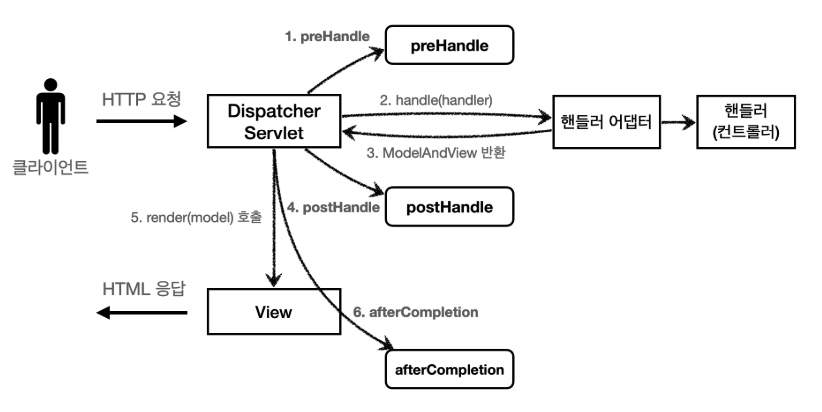
- 스프링 인터셉터 호출 흐름
![]()
preHandle: 컨트롤러 호출 전에 호출- preHandle의 응답값이 true 이면 다음으로 진행. false 이면 진행 x
postHandle: 컨트롤러 호출 후에 호출afterCompletion: 뷰가 렌더링 된 이후에 호출
- 예외 발생 시
- preHandle : 컨트롤러 호출 전에 호출된다.
- postHandle : 컨트롤러에서 예외가 발생하면 postHandle 은 호출되지 않는다.
afterCompletion: afterCompletion 은 항상 호출된다. 이 경우 예외( ex )를 파라미터로 받아서 어떤예외가 발생했는지 로그로 출력할 수 있다.
로그 인터셉터 구현 코드
1
2
3
4
5
6
7
8
9
10
11
12
13
14
15
16
17
18
19
20
21
22
23
24
25
26
27
28
29
30
31
32
33
34
35
36
37
38
39
40
41
42
43
44
45
46
47
48
49
50
51
52
53
54
@Slf4j
public class LogInterceptor implements HandlerInterceptor {

  public static final String LOG_ID = "logID";

  /**
   * 컨트롤러 호출 전에 호출
   */
  @Override
  public boolean preHandle(HttpServletRequest request, HttpServletResponse response, Object handler) throws Exception {

    String requestURI = request.getRequestURI();

    String uuid = UUID.randomUUID().toString();
    request.setAttribute(LOG_ID, uuid);

    if (handler instanceof HandlerMethod) {
      HandlerMethod hm = (HandlerMethod) handler;
      /**
       * HandlerMethod: 호출할 컨트롤러 메소드의 모든 정보가 포함되어 있음
       *
       * @RequestMapping: HandlerMethod
       * 정적 리소스: ResourceHttpRequestHandler
       */
    }

    log.info("request [{}], [{}], [{}]", uuid, requestURI, handler);
    return true;

  }

  /**
   * 컨트롤러 호출 이 후에 호출
   */
  @Override
  public void postHandle(HttpServletRequest request, HttpServletResponse response, Object handler, ModelAndView modelAndView) throws Exception {
    log.info("postHandle modelAndView [{}]", modelAndView);
  }

  @Override
  public void afterCompletion(HttpServletRequest request, HttpServletResponse response, Object handler, Exception ex) throws Exception {

    String requestURI = request.getRequestURI();
    String logId = (String) request.getAttribute(LOG_ID); // logId == uuid

    log.info("response [{}], [{}]", logId, requestURI);

    if (ex != null) {
      log.error("after completion error !!", ex);
    }

  }

}
request.setAttribute(LOG_ID, uuid)
서블릿 필터의 경우 지역변수로 해결이 가능하지만,
스프링 인터셉터는 호출 시접이 완전히 분리되어 있다.
preHandle, postHandle, afterCompletion 에서 함께 사용하기위해 담아둠
LogInterceptor도 싱글톤처럼 사용되기 때문에 멤버변수를 사용하면 위험하다.
1
2
3
if (handler instanceof HandlerMethod) {
  HandlerMethod hm = (HandlerMethod) handler; //호출할 컨트롤러 메서드의 모든 정보가 포함되어 있다.
}
HandlerMethod- 핸들러 정보는 어떤 핸들러 매핑을 사용하는가에 따라 달라진다.
- 스프링은 일반적으로 @Controller, @RequestMapping을 활용한 핸들러 매핑을 사용하는데, 이 경우 핸들러 정보로 HandlerMethod가 넘어온다.
ResourceHttpRequestHandler- /resources/static와 같은 정적 리로스가 호출되는 경우 ResourceHttpRequestHandler가 핸들러 정보로 넘어오기에 타입에 따라 처리가 필요하다.
postHandle,afterCompletion- 예외 발생 경우, postHandle는 호출되지 않는다.
- afterCompletion은 예외가 발생해도 호출되는 것을 보장한다.
인터셉터 설정 코드
1
2
3
4
5
6
7
8
9
10
11
12
@Configuration
public class WebConfiguration_Interceptor implements WebMvcConfigurer {

  @Override
  public void addInterceptors(InterceptorRegistry registry) {
    registry.addInterceptor(new LogInterceptor())
            .order(1)
            .addPathPatterns("/**")
            .excludePathPatterns("/css/**", "/*.ico", "/error");
  }

}
로그인 실패 후 찍힌 로그
1
2
3
4
5
6
INFO 53320 --- [nio-8080-exec-4] h.login.web.interceptor.LogInterceptor   : request [503794e8-4e82-45e6-8828-e1f820cb325d], [/login], [hello.login.domain.login.LoginController#LoginV4(LoginRequest, BindingResult, String, HttpServletRequest)]

INFO 53320 --- [nio-8080-exec-4] h.login.web.interceptor.LogInterceptor   : postHandle modelAndView [ModelAndView [view="login/loginForm"; model={loginForm=LoginRequest(loginId=set, password=teste), org.springframework.validation.BindingResult.loginForm=org.springframework.validation.BeanPropertyBindingResult: 1 errors
Error in object 'loginForm': codes [loginFail.loginForm,loginFail]; arguments []; default message [아이디 또는 비밀번호가 맞지 않습니다.]}]]

INFO 53320 --- [nio-8080-exec-4] h.login.web.interceptor.LogInterceptor   : response [503794e8-4e82-45e6-8828-e1f820cb325d], [/login]
PathPattern 공식문서
1
2
3
4
5
6
7
8
9
10
11
12
13
14
15
16
17
18
19
? 한 문자 일치
* 경로(/) 안에서 0개 이상의 문자 일치
** 경로 끝까지 0개 이상의 경로(/) 일치
{spring} 경로(/)와 일치하고 spring이라는 변수로 캡처
{spring:[a-z]+} matches the regexp [a-z]+ as a path variable named "spring"
{spring:[a-z]+} regexp [a-z]+ 와 일치하고, "spring" 경로 변수로 캡처
{*spring} 경로가 끝날 때 까지 0개 이상의 경로(/)와 일치하고 spring이라는 변수로 캡처

/pages/t?st.html — matches /pages/test.html, /pages/tXst.html but not /pages/
toast.html
/resources/*.png — matches all .png files in the resources directory
/resources/** — matches all files underneath the /resources/ path, including /
resources/image.png and /resources/css/spring.css
/resources/{*path} — matches all files underneath the /resources/ path and
captures their relative path in a variable named "path"; /resources/image.png
will match with "path" → "/image.png", and /resources/css/spring.css will match
with "path" → "/css/spring.css"
/resources/{filename:\\w+}.dat will match /resources/spring.dat and assign the
value "spring" to the filename variable
로그인 인터셉터 구현 코드
1
2
3
4
5
6
7
8
9
10
11
12
13
14
15
16
17
18
19
20
21
22
23
24
25
@Slf4j
public class LoginCheckInterceptor implements HandlerInterceptor {

  /**
   * 인증이라는 것은 컨트롤러 호출 전에만 호출되어야 하기에 preHandle 만 구현하면 된다.
   */

  @Override
  public boolean preHandle(HttpServletRequest request, HttpServletResponse response, Object handler) throws Exception {

    String requestURI = request.getRequestURI();

    HttpSession session = request.getSession(false);

    if (session == null || session.getAttribute(SessionConst.LOGIN_MEMBER) == null) {
      log.info("미인증 사용자의 요청: {}", requestURI);
      response.sendRedirect("/login?redirectURL=" + requestURI);
      return false;
    }

    return true;

  }

}
로그인 인터셉터 설정 코드 추가
1
2
3
4
5
6
7
8
9
10
11
12
13
14
15
16
17
18
19
@Configuration
public class WebConfiguration_Interceptor implements WebMvcConfigurer {

  @Override
  public void addInterceptors(InterceptorRegistry registry) {

    registry.addInterceptor(new LogInterceptor())
            .order(1)
            .addPathPatterns("/**")
            .excludePathPatterns("/css/**", "/*.ico", "/error");

    registry.addInterceptor(new LoginCheckInterceptor())
            .order(2)
            .addPathPatterns("/**")
            .excludePathPatterns("/", "/css/**", "/*.ico", "/error"
                    , "/members/add", "/login", "/logout");
  }

}
정리
서블릿 필터- 필터 인터페이스 구현
- WebConfig - 필터 설정(필터 순서를 정할수 있는 FilterRegistrationBean 사용)
스프링 인터셉터- HandlerInterceptor 구현
- WebConfig - WebMvcConfigurer 구현(addInterceptors 메소드 오버라이딩)
서블릿 필터 & 스프링 인터셉터: 웹과 관련된 공통 관심사를 해결하기 위한 기술- 개발자 입장에서 스프링 인터셉터가 편리하기에 특별한 문제가 없다면 인터셉터 사용하자.